Orca: A True Agent Development Environment for AI Coding
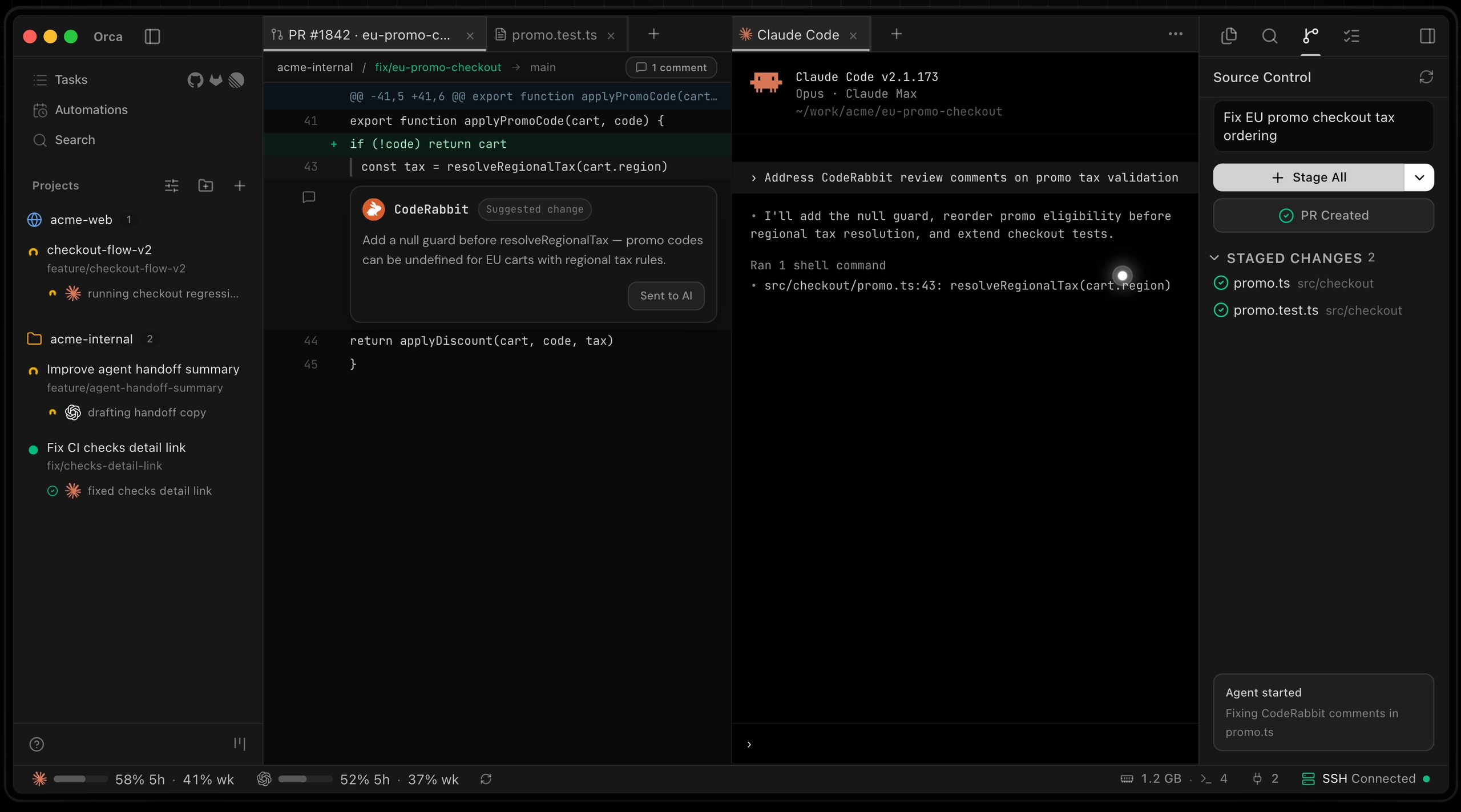
Orca — The most powerful Agent Development Environment (ADE)
AI coding tools are evolving rapidly. With agents like Claude Code, Codex, OpenCode, and Cursor CLI becoming increasingly capable, developers are shifting from writing every line of code themselves to orchestrating multiple AI workers.
The problem is that most development environments are still designed around human developers.
Orca takes a different approach.
Rather than positioning itself as another IDE, Orca describes itself as an Agent Development Environment (ADE) — a workspace built specifically for AI coding agents.
What Is Orca?
Orca is an open-source ADE that allows developers to run multiple AI coding agents—including Claude Code, Codex, OpenCode, and Cursor CLI—from a single interface.
The core idea is simple:
One task = One Git Worktree = One AI Agent
Each task runs inside its own isolated Git worktree, allowing agents to work independently without branch conflicts, stash management, or workspace contamination.
For example:
-
Assign a bug fix to Claude Code
-
Let Codex handle a refactor
-
Have OpenCode generate test coverage
All three can run simultaneously, and you can review the results before deciding which implementation to keep.
How Is It Different From Traditional IDEs?
Orca is not an IDE with AI features bolted on.
Instead, the entire environment is designed around agent workflows.
Parallel Worktrees
Each AI agent operates in its own isolated Git worktree.
Benefits include:
-
No branch conflicts
-
No stashing required
-
Multiple implementations can be explored simultaneously
This becomes especially valuable when working on large features or complex debugging tasks.
Ghostty-Style Terminal
Orca includes a high-performance built-in terminal with features such as:
-
Unlimited pane splitting
-
WebGL rendering
-
Searchable scrollback
-
Session recovery after restart
For developers who spend much of their time working with AI agents through the command line, this provides a streamlined experience.
Built-In Browser and Design Mode
Each worktree can launch its own Chromium-based browser.
One of the standout features is Design Mode.
When inspecting a UI element, Orca can automatically gather:
-
HTML
-
CSS
-
Screenshots
and provide that context directly to an AI agent.
This reduces the friction between identifying a UI issue and having an agent implement a fix.
Diff Reviews and Feedback Loops
Orca allows developers to review AI-generated changes directly inside the environment.
A typical workflow looks like this:
-
AI agent writes code
-
Developer reviews the diff
-
Feedback is attached to specific lines
-
The agent receives the feedback and revises its work
This creates a tight review loop without constantly switching between tools.
Built for Remote Development
Orca also supports running AI agents on remote machines.
Using SSH-based worktrees, developers can:
-
Leverage powerful remote servers
-
Automatically reconnect sessions
-
Forward ports
-
Cache SSH passphrases
This is particularly useful when working with large repositories, running expensive AI workflows, or using cloud infrastructure for development.
The Mobile Companion App
One of Orca’s most interesting features is its mobile companion app.
Most AI coding tools assume developers are sitting at their desks. Orca recognizes that AI agents often continue working long after the developer walks away.
The mobile app allows you to stay connected to your agents from anywhere.
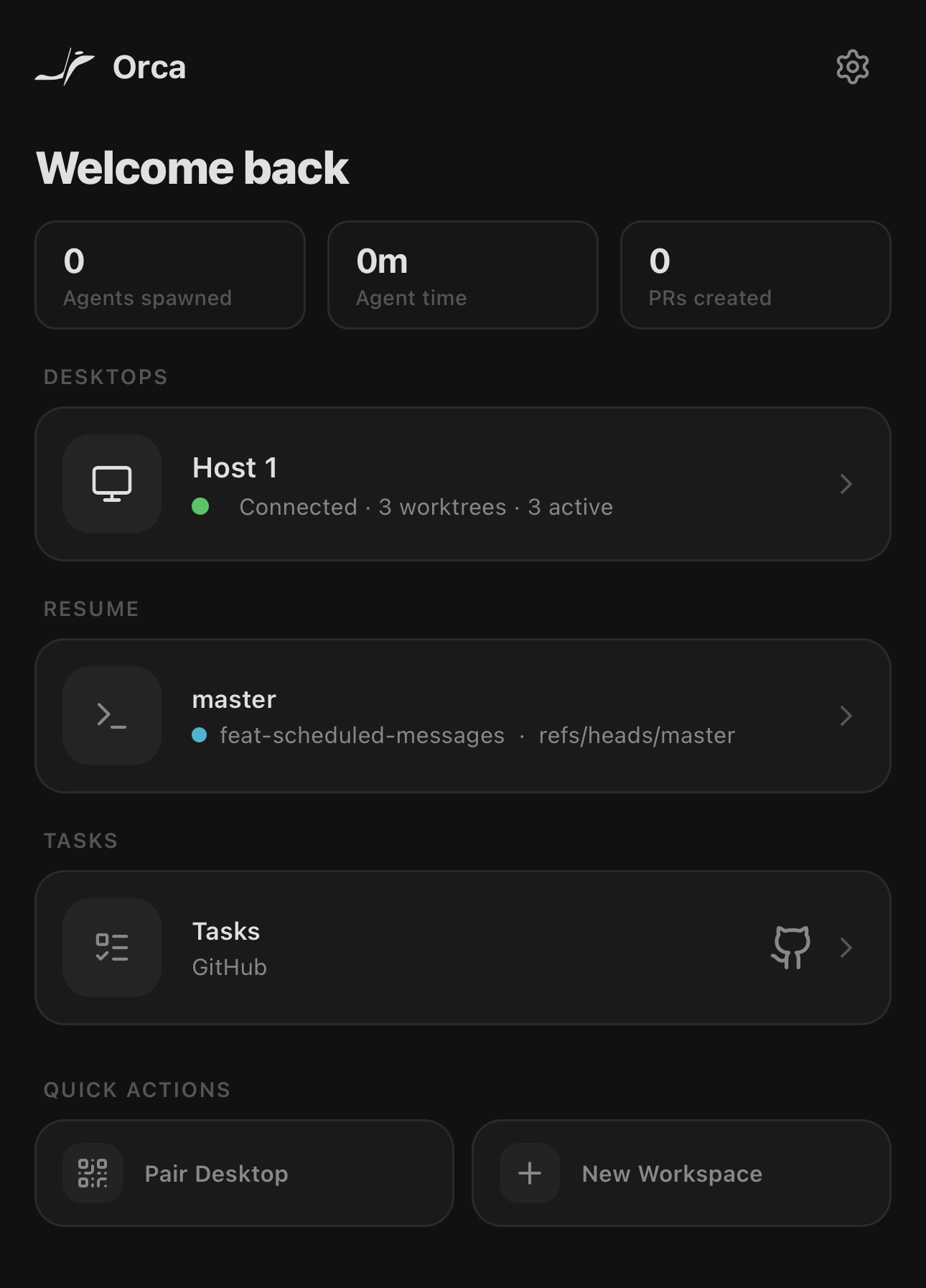
Monitor Agents Away From Your Desk
Using the companion app, developers can:
-
View agent status
-
Monitor task progress
-
Track usage
-
Switch between accounts
-
Keep terminal sessions connected
Whether you’re grabbing coffee, attending a meeting, or commuting, you can check on what your agents are doing without opening your laptop.
Especially Useful for Long-Running Tasks
AI agents often handle tasks that take significant time:
-
Large-scale refactors
-
Test suite generation
-
Codebase migrations
-
Extensive debugging sessions
Instead of remaining tied to your desk, you can:
-
Start work on your desktop
-
Launch one or more agents
-
Leave the workspace
-
Monitor progress from your phone
-
Return when the work is complete
This changes the relationship between developers and AI agents.
Rather than treating AI as a coding assistant that requires constant supervision, Orca enables a workflow where agents behave more like independent workers operating within defined boundaries.
Who Is Orca For?
Orca is particularly compelling for developers who:
-
Use Claude Code daily
-
Run multiple coding agents simultaneously
-
Prefer Git worktree-based workflows
-
Frequently develop on remote servers
-
Carefully review AI-generated code before merging
-
Want stronger orchestration tools for AI-assisted development
On the other hand, developers looking for a no-code AI experience may find Orca unnecessarily technical. It is built around Git, code reviews, worktrees, and developer-centric workflows.
Final Thoughts
As AI coding agents become more capable, development environments are beginning to evolve alongside them.
The future may involve less direct coding and more coordination between multiple specialized agents.
Orca is one of the first tools built specifically for that future.
With features like:
-
Parallel worktrees
-
Multi-agent orchestration
-
Remote execution
-
A mobile companion app
it offers a glimpse into what an agent-first development environment can look like.
If you already rely on tools such as Claude Code, Codex, or OpenCode, Orca is worth exploring—not as another IDE, but as a workspace designed for managing teams of AI agents.